



Building a second brain has always been the ultimate productivity promise, but for many of us, it felt more like a chore than a superpower. There is no shortage of PKM tools that can store information and process it, but most of them feel daunting due to the manual work involved.
After months of experimentation, I have finally bridged that gap and created a workflow where two tools don’t just coexist — they collaborate. Here is how I combined the source-heavy reliability of NotebookLM with Claude’s analytical depth to build a personal knowledge system that finally feels alive.
Related
I made these NotebookLM mistakes so that you don’t have to
Saving you from NotebookLM headaches
Using Claude as the Creative Engine
Creating Markdown Files on the Fly
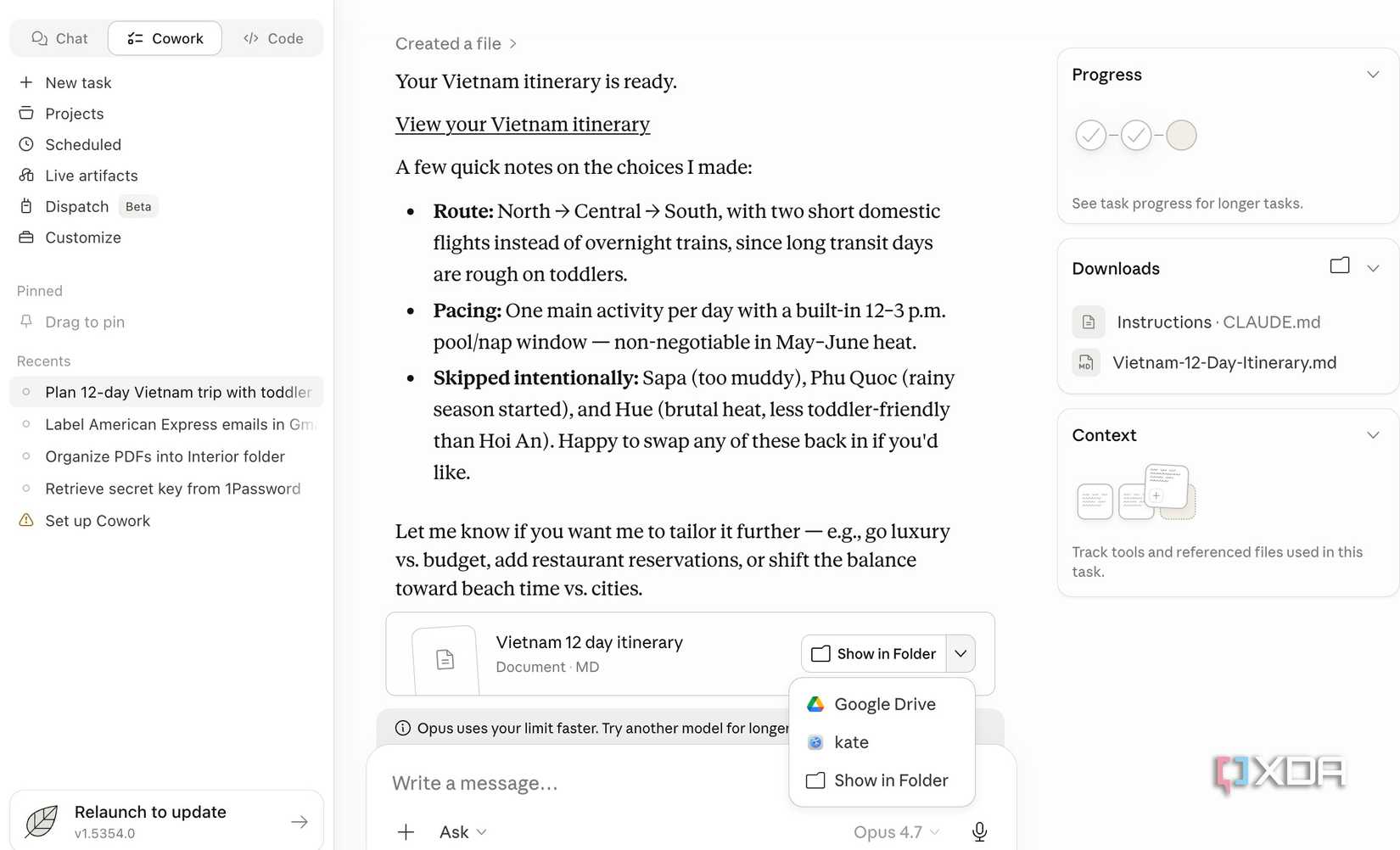
Claude Cowork handles my initial research phase. Instead of the usual copy-paste routine, I have started treating Claude like a digital assistant with direct access to my file system.
By giving it permission to a local directory (like my Downloads folder), I can turn a brainstorming session into a structured archive in seconds. I recently ran a prompt that saved me from manual organization. I simply told Claude:
Create an itinerary for a 12-day Vietnam trip, add tips for my 2-year-old, and as I’m planning for May-June, give relevant advice too. Save the entire file as Markdown in a folder called Vietnam in Downloads.
Within moments, Claude didn’t just generate the text; it created the Vietnam directory and dropped a perfectly formatted .md file inside.
The beauty of this is how it scales across different projects. For instance, when I’m researching a complex tech topic like comparing local LLM performance, I will ask Claude to:
Analyze the latest benchmarks for Llama 3 vs. Mistral, create a comparison table and save it as LLM_Benchmark.md in a new folder called AI Research in my Downloads.
By the time I’m ready to move these notes into NotebookLM for source-grounding, half my work is already done. I have a clean, local folder of Markdown files ready to be uploaded.

OS Windows, macOS
Individual pricing Free plan available; $17/month Pro plan
Group pricing $100/month per person for the Max plan
Claude is an AI assistant and LLM developed by Anthropic.
Creating a Notebook in NotebookLM
Process All the Relevant Information
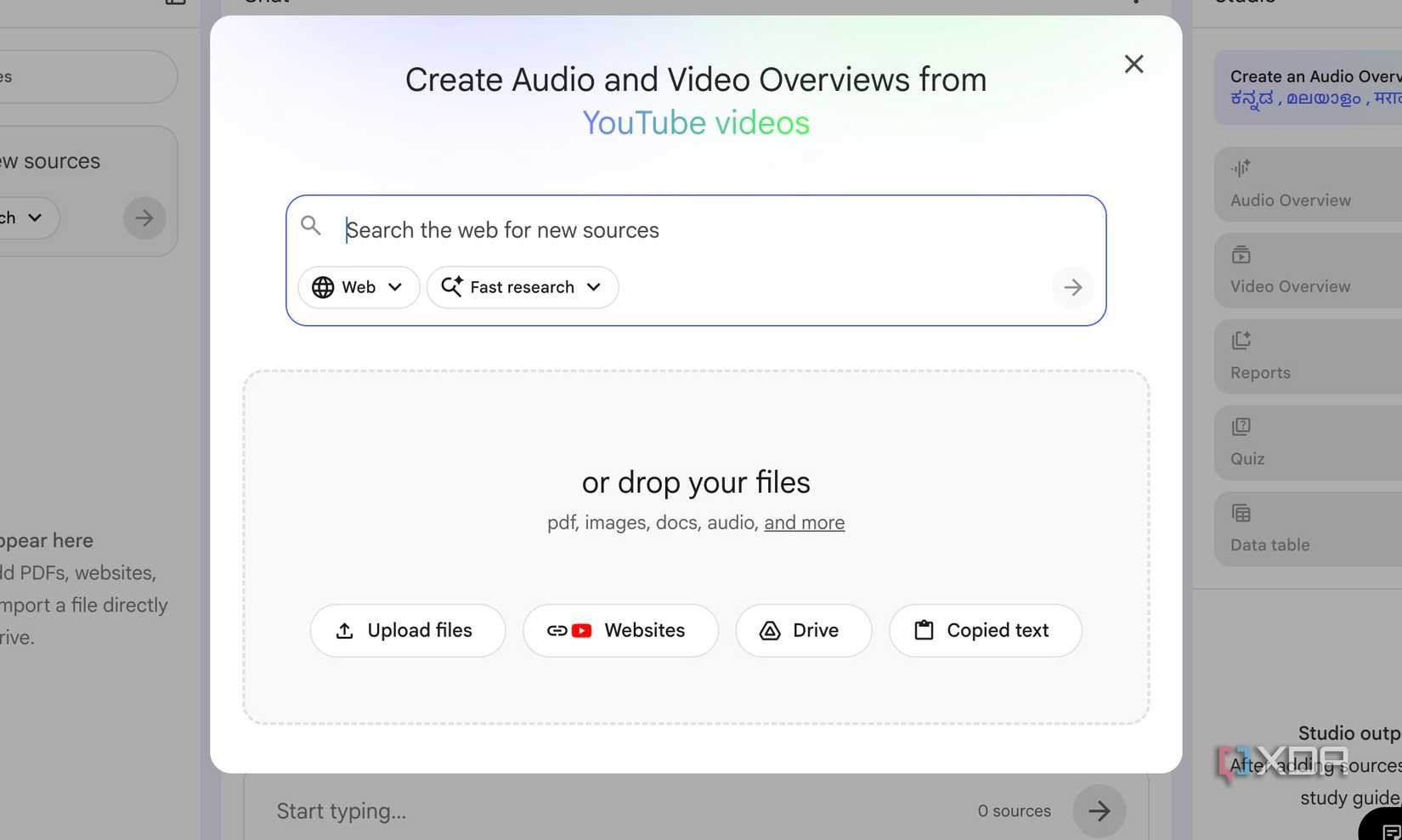
Once I have my local folder filled with those Claude-generated Markdown files, the next step is moving them into NotebookLM. Here is where Google’s AI note-taking tool takes over as the anchor for my research.
I start by creating a new notebook, like Vietnam Trip 2026, and the upload process is fluid. Since Claude had already done the heavy lifting by organizing my itinerary and toddler-travel tips in Markdown, I just dragged and dropped that entire folder into NotebookLM.
But I don’t stop at my own notes. I grab URLs from travel blogs or official visa sites and paste them in. I also found a few high-quality videos, like ‘Walking tour of Hanoi’ or a ‘Traveling Vietnam with a toddler’ vlog and dropped the links.
Sometimes, a stray thought hits me that isn’t in a file or a link — like a specific budget reminder or a note about a friend’s recommendation in Da Nang. I will use the Create New note feature right inside the interface to manually type those in.
It’s like having a digital scratchpad that immediately becomes part of the total intelligence of the notebook.
Using NotebookLM at Its Best
Unlock the Full Potential of Your PKM System
Once that notebook is complete, NotebookLM turns into a beast of a research partner. The real power isn’t just in the organization; it’s the speed.
I can throw highly specific questions at my data and get grounded answers in seconds.
- Based on the Sapa and Ninh Binh YouTube vlogs I uploaded, which specific paths are stroller-friendly, and which require a carrier?
- Cross-reference my hotel bookings with the neighborhood guides: are there 24-hour convenience stores near our stay in Da Nang for emergency milk or diaper runs?
- What are the best indoor backup activities in Ho Chi Minh City if we get caught in a monsoon downpour?
- Summarize Day 4 of my itinerary into a one-page briefing doc that includes our flight number, hotel address in Vietnamese for the taxi driver, and two nearby vegetarian dinner options.
The possibilities don’t stop at text. For instance, I wanted to present the final plan to my family to get everyone on the same page. Instead of building a deck manually, I just asked NotebookLM to generate a slide deck directly from the studio panel.
I have started applying this NotebookLM logic to almost every part of my professional life. I use the Claude and NotebookLM combo for my investment analysis, learning Python, setting up self-hosting services, and more.
Related
4 unique ways I use Claude that has nothing to do with coding
The Claude revolution.
The Power Couple
The true measure of a second brain isn’t how much information it holds, but how effectively it serves your output. By combining NotebookLM and Claude, I don’t have to deal with any compromises in my PKM system.
If you have been waiting for the moment where AI transitions from a novelty into a core part of your workflow, this is it. Of course, this is just my PKM system. Yours can be completely different based on your requirements and workflow. Feel free to try new, creative methods to make the most of this pairing.
For further reading, you can check the original source Here.
“`

